
Site Check: a free check for any web page
Type a web address and Site Check reads that page the way a search engine, a screen reader and an AI search service would. You get a score out of 100 and the three things most worth fixing, in plain English, in about half a minute. No sign-up, and no email address unless you want the full report sent to you.
Your result
- 0 errors
- 0 warnings
- 0 notices
The top three things to fix
Speed, from Google PageSpeed
These four scores are Google's own and are separate from the Site Check score above.
Check your whole site
This checked one page. The free Chrome extension checks every page, and every link and image on them.
Add Site Check to ChromeWant these fixed?
We build and look after websites, and fixing what Site Check finds is everyday work for us.
Talk to usWhat Site Check looks at
The same checks run here, in the Chrome extension and in the tool we use on our own clients' sites. It is one piece of software, so the answers match.
Broken links and images
Every link and image on the page is tested. A link is only called broken when it definitely is.
Titles and descriptions
The page title and meta description: missing, too long, too short, or the same as another page.
Headings
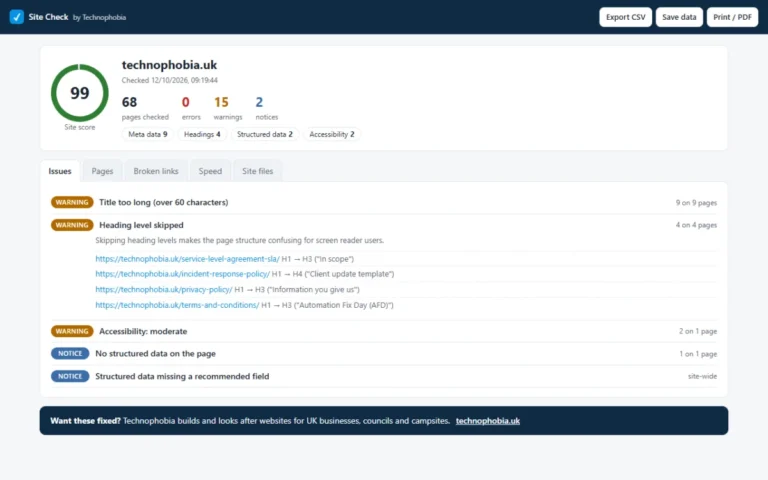
One main heading, no empty headings and no skipped levels, so the page has a clear outline.
Image alt text
Images with no description for people who cannot see them, and descriptions that are just a file name.
Structured data
The labelled facts (business details, products, events) that search engines read, and any required field that is missing.
Social sharing tags
The title, description and picture shown when the page is shared on Facebook, WhatsApp or LinkedIn.
Accessibility
WCAG 2.2 levels A and AA, tested in a real browser with axe-core, plus a keyboard pass for the skip link and focus highlight.
Speed
Google PageSpeed for mobile and desktop. These are Google's own scores, shown separately.
AI search readability
Can ChatGPT, Claude, Perplexity, Bing and Google read and understand the page? Checks for snippets switched off, text that only appears after JavaScript runs, questions with no FAQ data, FAQ data that does not match the page, business details with no links to official profiles, and content locked inside a third-party widget. We measure whether a page can be read and understood, nothing more: it is not a prediction that an AI will quote you.
Whole-site checks, in the extension
Some checks need the whole site, not one page: robots.txt (including whether AI search crawlers are blocked), whether the server turns AI crawlers away, the sitemap, duplicate titles and pages nothing links to. Those run in the Chrome extension.
What the scores mean
The page score
Every page starts at 100. Each error takes off 10, each warning 3 and each notice 1. The score never goes below 0. So a page with two errors, three warnings and four notices scores 100 − 20 − 9 − 4 = 67.
The ring colour
Green is 80 and over. Amber is 50 to 79. Red is under 50.
The site score
On a whole-site check, the site score is the average of the page scores. The check on this page looks at one page, so you get that page's score.
Errors, warnings and notices
An error is something broken or missing that stops the page working for someone. Example: "Image has no alt attribute".
A warning is something that weakens the page and is worth fixing. Example: "Title too long (over 60 characters)".
A notice is a nice-to-have. Example: "No share image (og:image)".
Links that could not be verified
Some websites refuse automated checks, including Facebook, LinkedIn and anything behind bot protection, while working perfectly for people. Site Check reports those as "could not be verified" and does not count them as broken, because it has no proof that they are. Open one once by hand to confirm.
Speed scores are Google's, not ours
The four speed scores (Performance, Accessibility, Best practices and SEO) come from Google PageSpeed and run from 0 to 100. Google colours them green at 90 and over, amber from 50 to 89 and red under 50. They are Google's numbers and are separate from the Site Check score: a page can do well on one and badly on the other.
What an automated check cannot tell you
An automated accessibility check finds some WCAG failures, not all of them. It cannot tell whether alt text is accurate, whether a page makes sense read aloud, or whether a form is easy to complete. A high score is a good sign. It is not a compliance certificate, and it does not replace testing by people.
Check your whole site with the Chrome extension
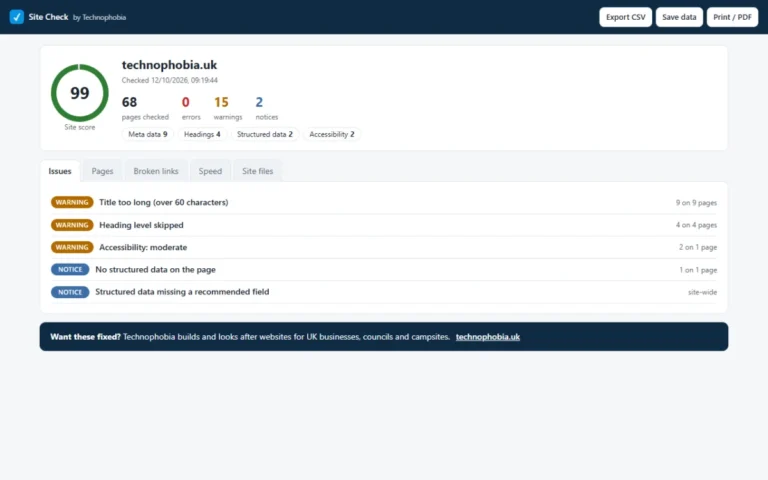
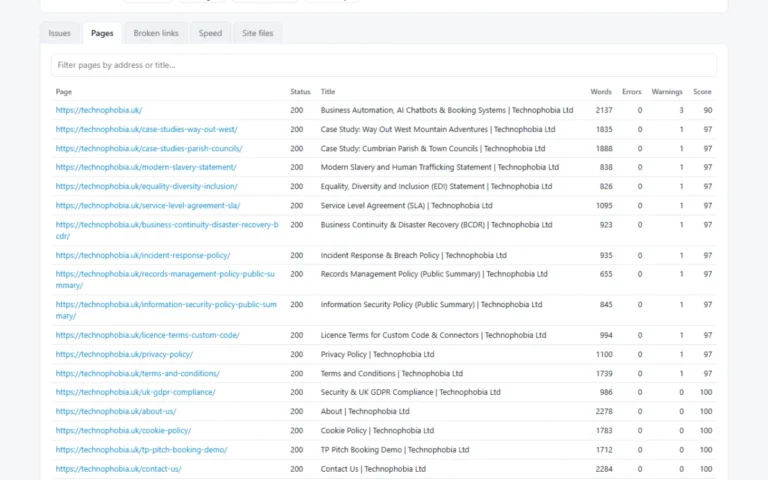
The check on this page looks at one page. Site Check for Chrome looks at all of them: it follows the links through your site, then tests every link and image it found, and checks whether search engines and AI search crawlers are allowed in.
Page or whole site. Check the page you are on, or the whole site up to a page limit you choose.
Re-check after fixing. Run it again and see what is fixed, what is still to do and what is new.
Export. Save the results as a CSV spreadsheet or a PDF.
Safe on shops. It never follows basket, checkout, account or log-out links, so it cannot change anything on a live shop.
Runs in your own browser. Your pages are read by your browser, not sent to us.
Your privacy
The check on this page is made from Technophobia's server, so the address you type is sent to us and the page is read from there. We do not keep your IP address. If you ask for the full report by email we send one email; the report link works for 7 days and we delete your address after 30 days. We do not add you to a mailing list. Read the Site Check section of our privacy policy.
Found problems? We fix them.
We build and look after WordPress websites, and putting right what Site Check finds is everyday work for us.